Text2Test Logo
Request a Demo
Tools · Data Sources

Data Sources. One file, one HTTP response, one plan run per row.

Upload a CSV. Wire up a saved HTTP request. Bind it to a plan. Text2Test iterates the test suite once per row, so coverage scales with your data set.

Request a DemoSee all features
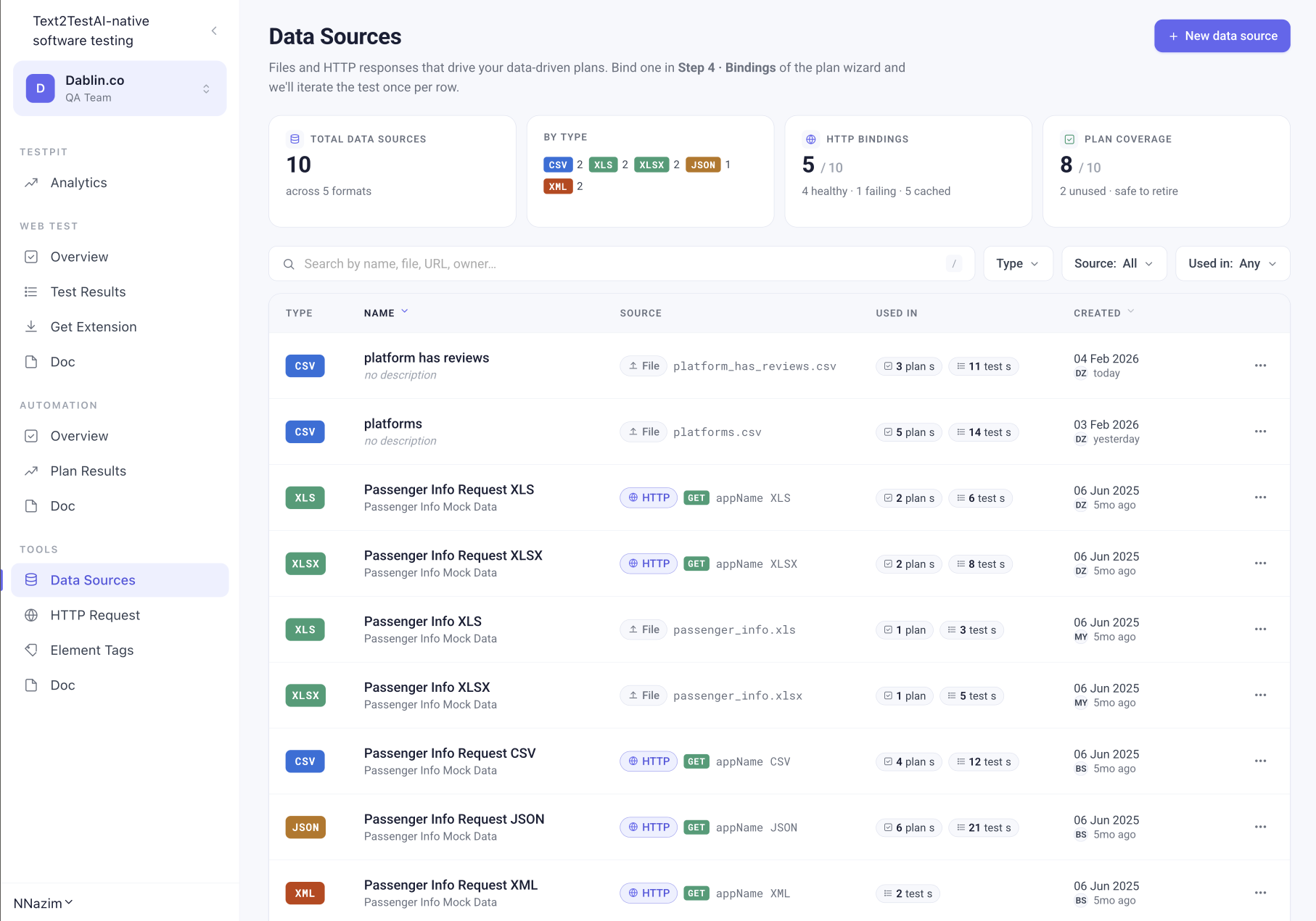
Text2Test data source bound to a plan, running once per row

Data Sources

Files and HTTP responses that drive your data-driven plans.

Total Data Sources
10
across 5 formats
By Type
5 formats
CSV 2 · XLS 2 · XLSX 2 · JSON 1 · XML 2
HTTP Bindings
5 / 10
4 healthy · 1 failing · 5 cached
Plan Coverage
8 / 10
2 unused · safe to retire
TypeNameSourcePlansTests
CSVplatform has reviewsplatform_has_reviews.csv3 plans11 tests
CSVplatformsplatforms.csv5 plans14 tests
XLSPassenger Info Request XLSHTTP GET appName XLS2 plans6 tests
XLSXPassenger Info Request XLSXHTTP GET appName XLSX2 plans8 tests
JSONPassenger Info Request JSONHTTP GET appName JSON6 plans21 tests
Two ways to bind data

Upload a file or wire up an API.

Pick whichever is closer to where your data already lives. Both produce the same thing: a row-by-row driver for your plan.

File upload

Drop a file. Schema auto-detected.

Upload a CSV, XLS, XLSX, JSON, or XML file (up to 100 MB). The first row is the schema. Name it, describe it, save it. Done.

CSV, XLS, XLSX, JSON, XML
Up to 100 MB per file
Headers in the first row, auto-parsed
Preview, download, edit, delete from the row menu
HTTP request

Bind a saved API call. Refresh on every run.

Pick any saved HTTP Request from your workspace. Text2Test calls it before the plan runs and feeds the parsed response into the test as rows. Always fresh.

Reuse any saved request from your workspace
Refresh policy: every run, cached, or scheduled
Health status: healthy, failing, cached
Preview the response before binding
Step 4 · Bindings

Bound in the plan wizard. Iterated once per row.

When you create a plan, Step 4 of the wizard is Bindings. Pick a data source, map its columns to your test variables, and the plan runs the suite once for every row.

A CSV with 50 customer records produces 50 runs of the same test cases. Different inputs, same coverage, one schedule.

Plan wizard · Step 4
Bind: platforms.csv
50 rows detected

{{platform_name}} → platform_name column
{{user_email}}    → user_email column
{{plan_tier}}     → plan_tier column✓ This plan will run 50 times, once per row
Plan coverage

Know which data sources are actually used.

The overview tracks which data sources are bound to plans and which are not. Retire the unused ones with confidence.

Plan Coverage

How many of your data sources are bound to at least one plan. Spot the unused ones at a glance.

HTTP Health

Healthy, failing, or cached. A failing data source means a plan would run with stale data, so catch it first.

Used In

Per row: how many plans use this source and how many tests run against it. Click to jump to the plan.

Created by

Who added the source and when. Audit trail for shared workspaces.

Five formats. One row model.

Whatever format your data lives in, Text2Test parses it into rows.

CSVXLSXLSXJSONXML
Tools that work together

Data Sources, HTTP Request, Element Tags. The plumbing under your tests.

Build a saved HTTP Request once, use it as a Data Source for a plan or as a step inside a test case. Tag elements once, reuse across tests.

HTTP RequestElement Tags
FAQ

Common questions

One file. Fifty rows. One scheduled plan.

See how Data Sources scale your coverage without writing fifty test cases. Live demo, your data, your stack.

Request a Demo