Text2Test Logo
Request a Demo

HTTP Request. The API tool you already know, wired into your test cases.

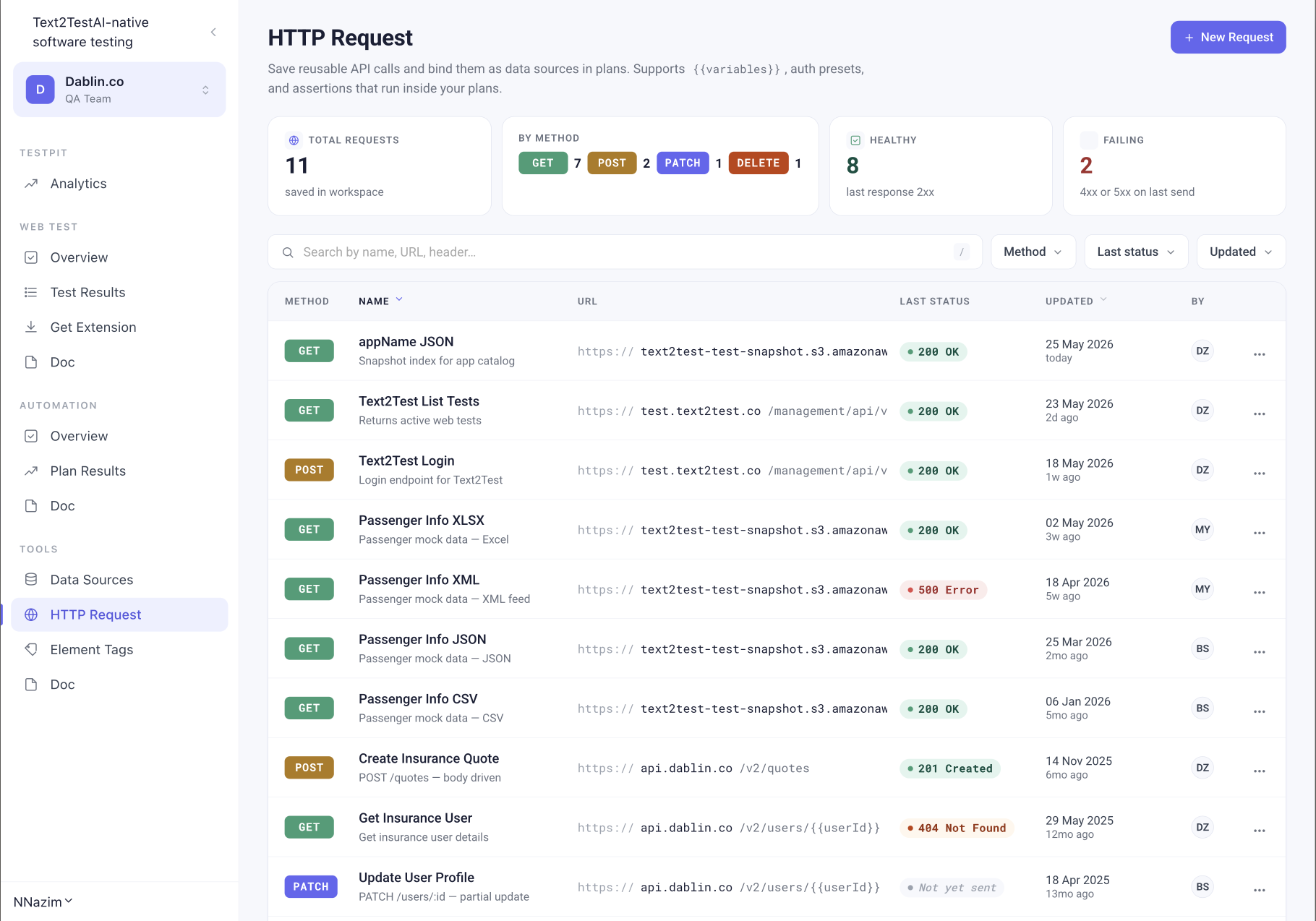
Save reusable API calls and bind them as data sources in plans. Supports {{variables}}, auth presets, and assertions that run inside your plans.

Request a DemoExplore all sequence types
Text2Test HTTP Request list view with stats and saved requests
One request, three jobs

Build it once. Reuse it everywhere.

01

Standalone API tool

A Postman-style scratchpad scoped to your workspace. Method, URL, params, auth, headers, body. Send and inspect.

02

Data source for plans

Bind a saved request to a test plan. Login first, capture the token, pass it to the next step.

03

Step in a test case

Mix HTTP Request with T2T Native, Visual Verification, Autopilot, or Script Injection in the same sequence.

Tab anatomy

Everything you expect, nothing you don't

If you've used Postman or Insomnia, you already know how to use this. The difference is what happens after Send.

Params

Per-row key, value, and description. Checkbox per row to enable or disable without deleting. Live count in the tab label.

Auth

No Auth, Bearer Token, Basic Auth, API Key, OAuth 2.0. Bearer is the default. Variables resolve at send-time.

Headers

Per-row toggle. Variable support in keys and values.

Body

JSON, form-data, x-www-form-urlencoded, raw, or binary. Tab shows a dot when body has content.

Tests

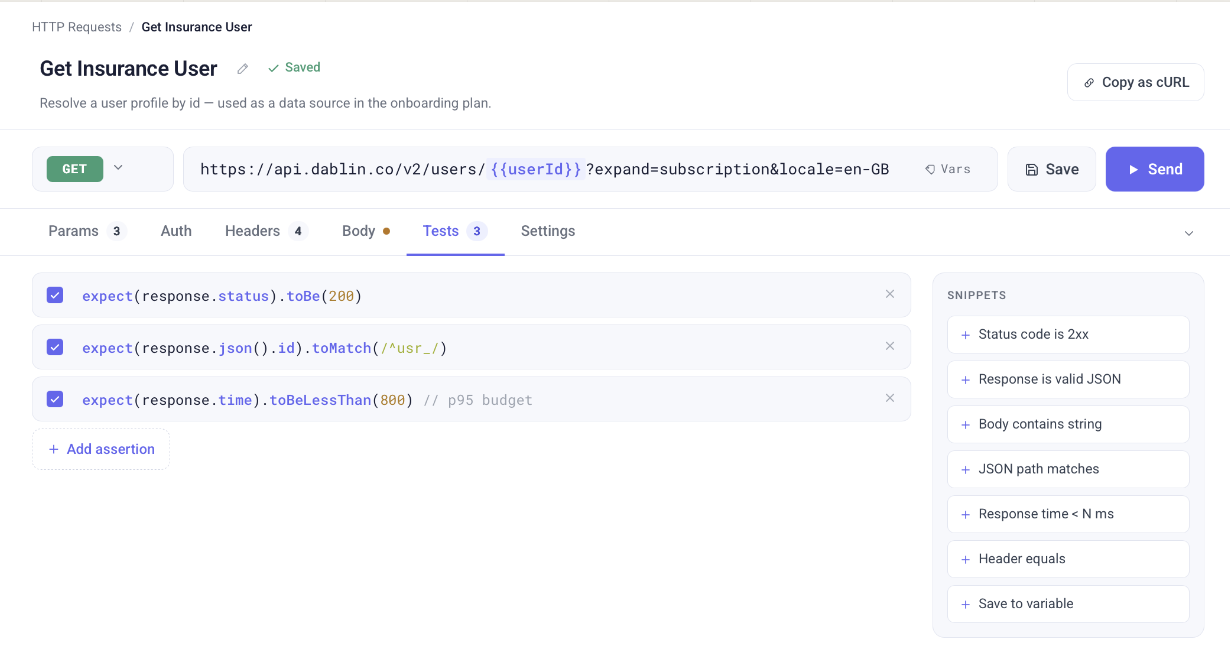
Assertions that run after every Send and inside plans. Seeded with examples like status code 200, JSON path match, response time under 800ms. Snippet sidebar for common assertions.

Settings

Follow redirects, timeout, encode URL automatically, verify SSL certificate, retry on failure, send cookies. Sensible defaults.

Variables and chaining

The token from step one shows up in step two. Automatically.

Use {{authToken}} anywhere in your request. Workspace variables resolve at send-time, stay encrypted at rest, and chain across steps.

Login captures a token. The next step in your test case uses it. No glue code, no environment files, no manual juggling.

POST /auth/login
save {{authToken}}
GET /v2/users/me
Authorization: Bearer {{authToken}}
Assertions, not pings

An HTTP request without assertions is just a curl command.

Every saved request can carry its own test assertions. The seeded set includes status code checks, JSON path matchers, response time budgets, and header validation. One-click snippets cover the common cases.

When the request runs inside a test case, those assertions count. Fail one and the test case fails.

HTTP Request test results showing three passing assertions in Text2Test
Response inspection

Inspect the full response, not just the status code

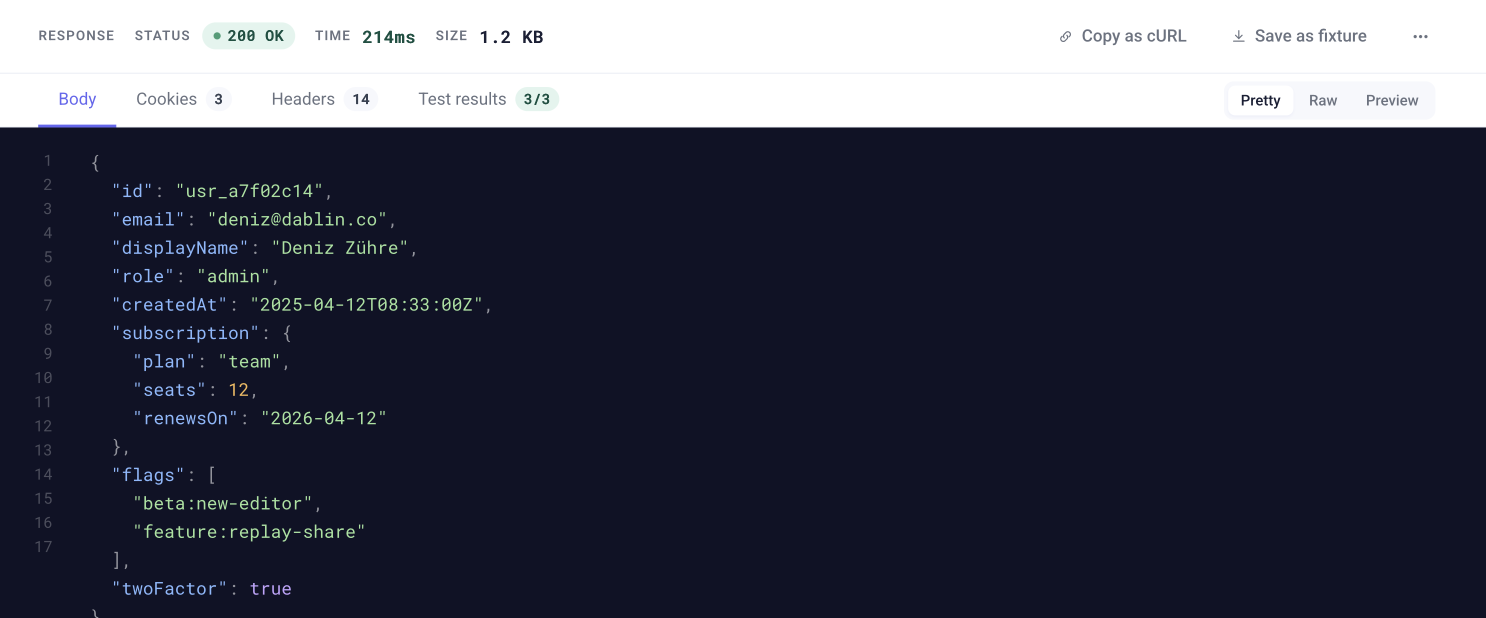
After every Send, the response panel shows status, time, size, and four tabs: Body, Cookies, Headers, Test results. JSON pretty-print, raw, and preview views. Test result counts visible in the tab label so you know at a glance how many assertions passed.

Save the response as a fixture. Copy as cURL. Done.

HTTP Request response panel with Body, Cookies, Headers, and Test results tabs in Text2Test
One of five sequence types

HTTP Request is a step. Not a separate tool.

Inside a test case, mix HTTP Request with plain text steps, visual checks, script injection, or Autopilot. Same sequence. Same run. Same report.

T2T NativeScript InjectionAutopilotVisual VerificationHTTP Request
Test case sequences

One Test Case. Five Ways to Build a Step.

A test case in Text2Test is not a single instruction type. It is a sequence. Each step can be a different prompt type, combined in any order to match exactly what you need to test.

T2T Native

Write the steps in plain text. Text2Test Native reads the screen semantically and executes. No selectors, no DOM knowledge required.

Script Injection

Paste an existing script or auto-generate one and run it inline within the test. For when you need precise programmatic control at a specific step.

T2T Autopilot

Hand control to AI for complex flows that need reasoning. Autopilot navigates the product autonomously and hands back when done.

Visual Verification

Take a screenshot diff or check element visibility at any point in the sequence. Catches layout regressions and UI changes.

HTTP Request

Call an API and assert on the response. Combine with UI steps to test the full stack in a single test case.

Mix and build in any order. A test case can start with a T2T Native step, run an HTTP request to set state, verify visually, inject a script for a specific action, and hand off to Autopilot for the final flow. All in one sequence.

FAQ

Common questions

One workspace. Every API call. Every test case.

See how HTTP Request fits inside your test cases. Live demo, your stack, your API.

Request a Demo