Text2Test Logo
Request a Demo
Reporting·Plan Reports

Every plan run, with inline errors and one-click re-run failed.

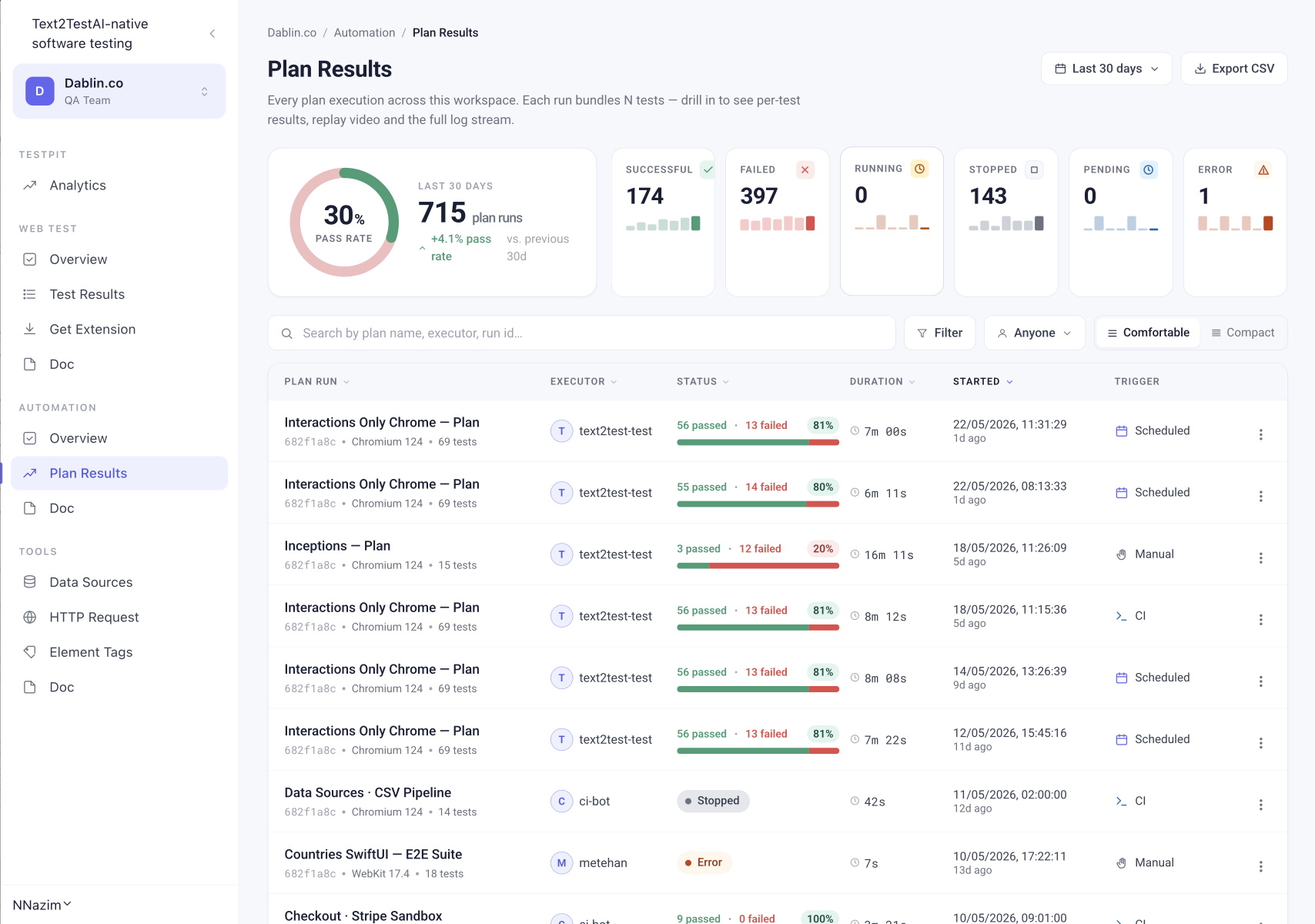
A plan bundles N tests into a single run. Plan Reports show the pass rate, success/failure split, and per-test breakdown for every plan execution. Click any plan run to see all tests inside, with error snippets inline on failures.

Request a DemoSee all features
Text2Test Plan Results — pass rate and status breakdown over last 30 days
What a plan report shows

Drilled three levels deep, by default.

01

Top level: Plan run summary

Pass/fail split, total duration, executor, browser, trigger (Manual, Scheduled, CI), and how many tests ran.

02

Mid level: Test list

Every test in the run. Pass/fail status, duration, and error preview inline on failures (TimeoutError, AssertionError, message snippets).

03

Bottom level: Step replay

Click any test to drill into its step-by-step Test Report.

No log files

The error is in the row. Not in a log file.

When a test fails inside a plan, the result row shows:

Test name
Failing step
Error type (TimeoutError, AssertionError, NetworkError)
Error message preview
Step number

Click the row to drill into the full Test Report with screenshots, AI requests, and replay video.

Plan-level actions

Re-run, export, share. One click each.

Re-run plan
Same env, same tests
Re-run failed only
Skip passes, save time
Copy share link
Public, 7-day expiry
Download report
Full plan run summary as PDF
Delete run
Remove from history
Trigger visibility

Know what kicked off every run.

The Trigger column shows which one, so you can separate ad-hoc runs from CI gates from scheduled checks at a glance.

Manual

Someone clicked Run

Scheduled

A cron job fired

CI

Triggered from your CI pipeline

30 days

See where quality is heading. Not just where it is.

A single pass rate number is a snapshot. A pass rate over 30 days is a trend. Text2Test surfaces both, so you can answer "are we getting better or worse?" in one glance.

Trend vs previous 30d

Every dashboard compares the current window to the previous one. +4.1% pass rate this month versus last. Catch direction, not just position.

Daily pattern

30 daily bars on each card. Spot the bad day, the bad week, the moment something broke. Hover for the exact run count.

Pass rate ring

A single donut at the top of every report. 30 days, every run included. The number that goes in your sprint review.

Save time on the obvious

Don't rerun the suite. Rerun the failures.

After you fix something, you don't need to rerun all 100 tests to confirm. Re-run failed only repeats just the tests that failed in the last plan run. Faster confirmation, same coverage.

Available from:

The plan run row menu
Inside the plan run drawer
After any failed plan execution
FAQ

Common Questions

Every plan run. Drillable. Shareable. Exportable.

See how Plan Reports turn scheduled runs into something your team can act on. Live demo, your plans.

Request a Demo