Text2Test Logo
Request a Demo

Reporting. From homepage stats down to a single AI request inside a step.

Every test run and every plan run is captured. Pass rate trends across 30 days. Per-step replay with AI request and response logs. Inline error snippets that tell you exactly what to fix.

Request a DemoSee all features
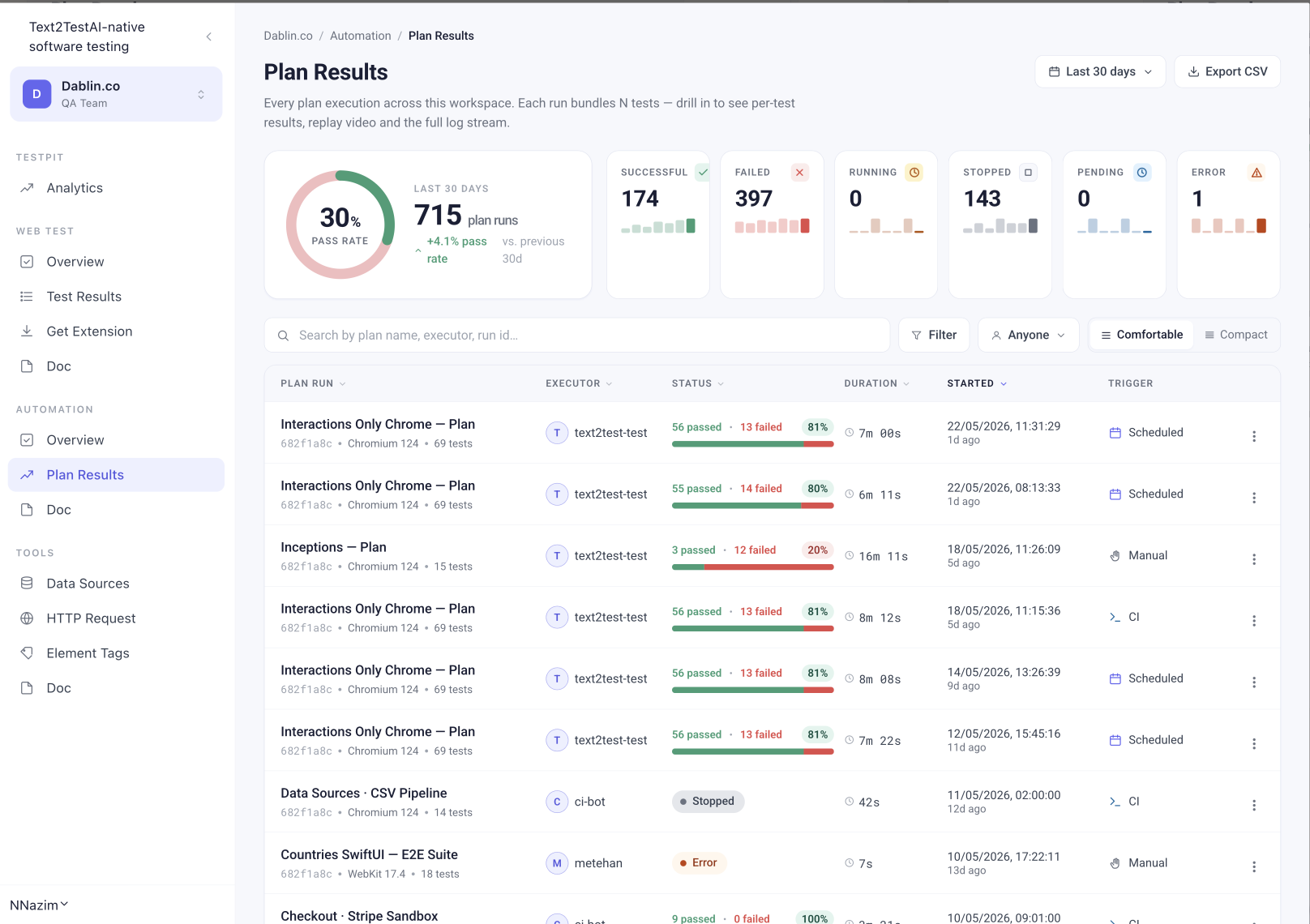
Text2Test Plan Reports — pass rate, run status breakdown, last 30 days
Two reports

Test Reports and Plan Reports. Same drill, different scope.

A test run is one execution of one test case. A plan run is one execution of a bundle of tests. Both reports follow the same pattern: pass rate at the top, filterable list in the middle, drillable detail on the right.

Test Reports

Every individual test execution. Pass/fail, duration, executor, browser, environment. Click any test to see step-by-step replay, AI requests, screenshots, console logs, network calls.

See Test Reports

Plan Reports

Every plan execution. Pass rate trends, success/failure split, plan-level filters. Click any plan run to see all tests inside, inline error snippets, and re-run failed only.

See Plan Reports
Pass rate analytics

See where quality is heading. Not just where it is.

A single pass rate number is a snapshot. A pass rate over 30 days is a trend. Text2Test surfaces both, so you can answer "are we getting better or worse?" in one glance.

Trend vs previous 30d

Every dashboard compares the current window to the previous one. +4.1% pass rate this month versus last. Catch direction, not just position.

Daily pattern

30 daily bars on each card. Spot the bad day, the bad week, the moment something broke. Hover for the exact run count.

Pass rate ring

A single donut at the top of every report. 30 days, every run included. The number that goes in your sprint review or board update.

Drillable detail

Click once, see the failing step. Click twice, see the AI request that ran it.

Every plan run opens to its test list. Every test opens to its step timeline. Every step opens to its AI request, AI response, and screenshot.

No tab-hopping. No log files. No "let me check the CI build."

Flakiness tracking
Soon

Tag a flaky test once. See it tracked forever.

A failed test is not always a real failure. Sometimes the test runs the same flow twice, fails the first time, passes the second. Most teams either ignore the flake or rerun the whole suite. Both lose time.

From any test row, mark it as flaky. The system tags the test, surfaces it in analytics, and keeps a flake count over time. You see which tests need fixing versus which tests are catching real bugs.

One-click flag

From the test row menu, mark as flaky. Single action, no separate workflow.

Analytics surface

Flaky tests appear in a dedicated view. Sort by flake count. See trends per test, per environment, per executor.

Track until fixed

A flake is logged the moment you tag it. Once you ship a fix, you can verify the same test passes consistently across runs.

Built for teams

Reports your team actually uses.

Share link

One-click public URL. Send to anyone, no account needed. Link expires after 7 days for security.

Export PDF Report

Polished run summaries ready to share. Drop into sprint reviews, customer reports, or internal docs.

Export CSV

Plan run summaries for sprint reviews, board updates, customer reports.

Download replay video

Full run replay as MP4. Drop into Jira tickets, customer reports, internal docs.

Find the run that broke yesterday in two clicks.

Filter by:

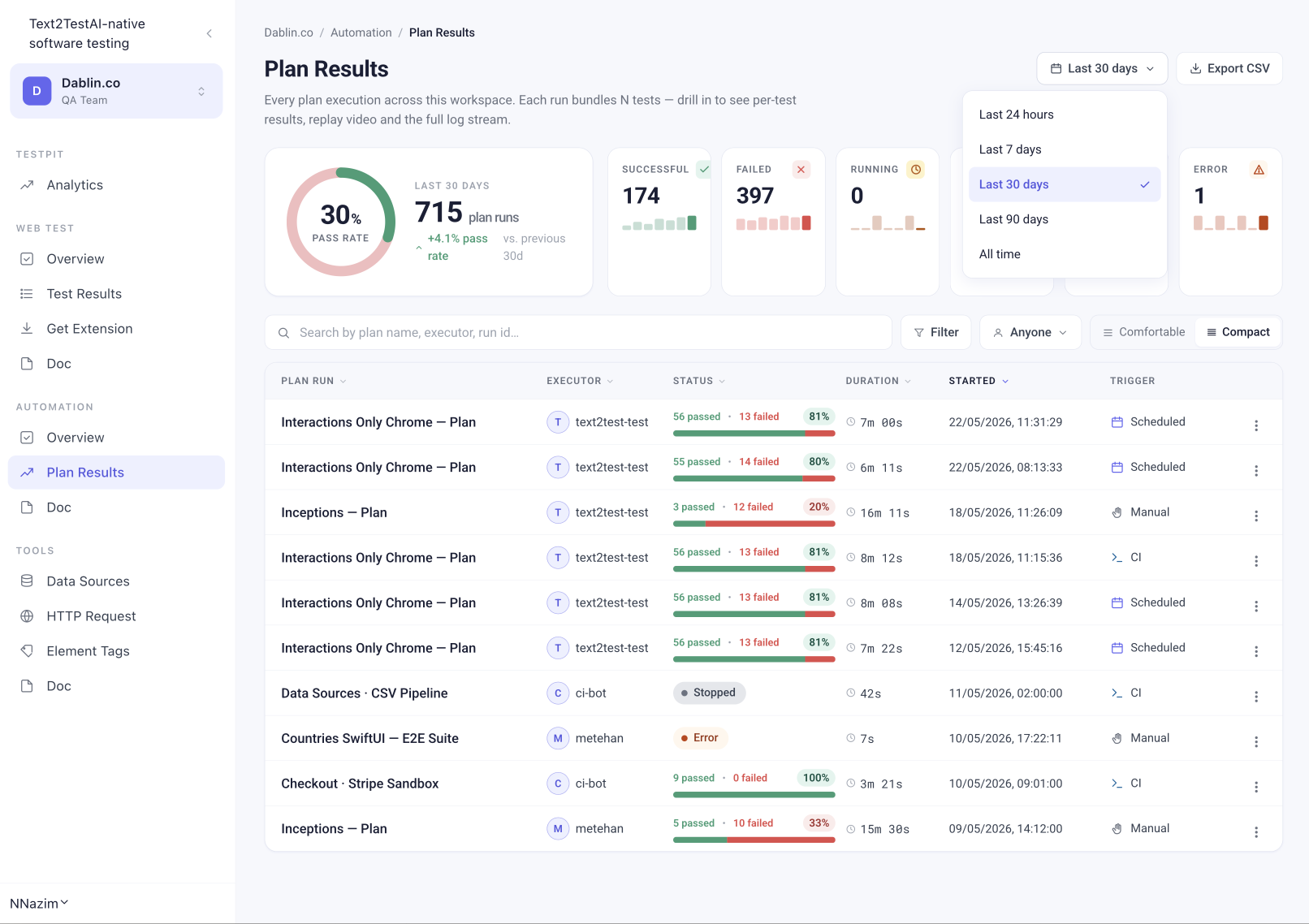
Time rangeLast 7, 30, 90, 365 days, or custom
StatusPassed, failed, running, stopped, pending, errored
ExecutorWho ran it, including ci-bot
BrowserChrome, Firefox, Safari, Edge, Opera, Brave, Mobile, Extension
TriggerManual, scheduled, CI
Plan or test nameFull-text search
Text2Test report filtered by date range, status, executor and browser
How it connects

Plans run. Reports capture. Failures drill.

Reporting is not a separate feature you turn on. Every plan you create automatically captures results. Every test inside that plan captures step-by-step detail. The reports exist the moment your plan finishes.

See Test Automation
FAQ

Common Questions

Every run. Every step. Every error.

See how Text2Test reports turn raw test runs into something your team can act on. Live demo, your stack, your tests.

Request a Demo